PC prompts you can check
The table records labels visible in a third-party gameplay screenshot, re-inspected by this wiki on 28 November 2026. The screenshot accompanies the Myvoxels first-play article, previously recorded here as dated 22 November. The image was accessible during this review; the article text could not be re-fetched, so its publication date is an archived source date, not a fresh check.
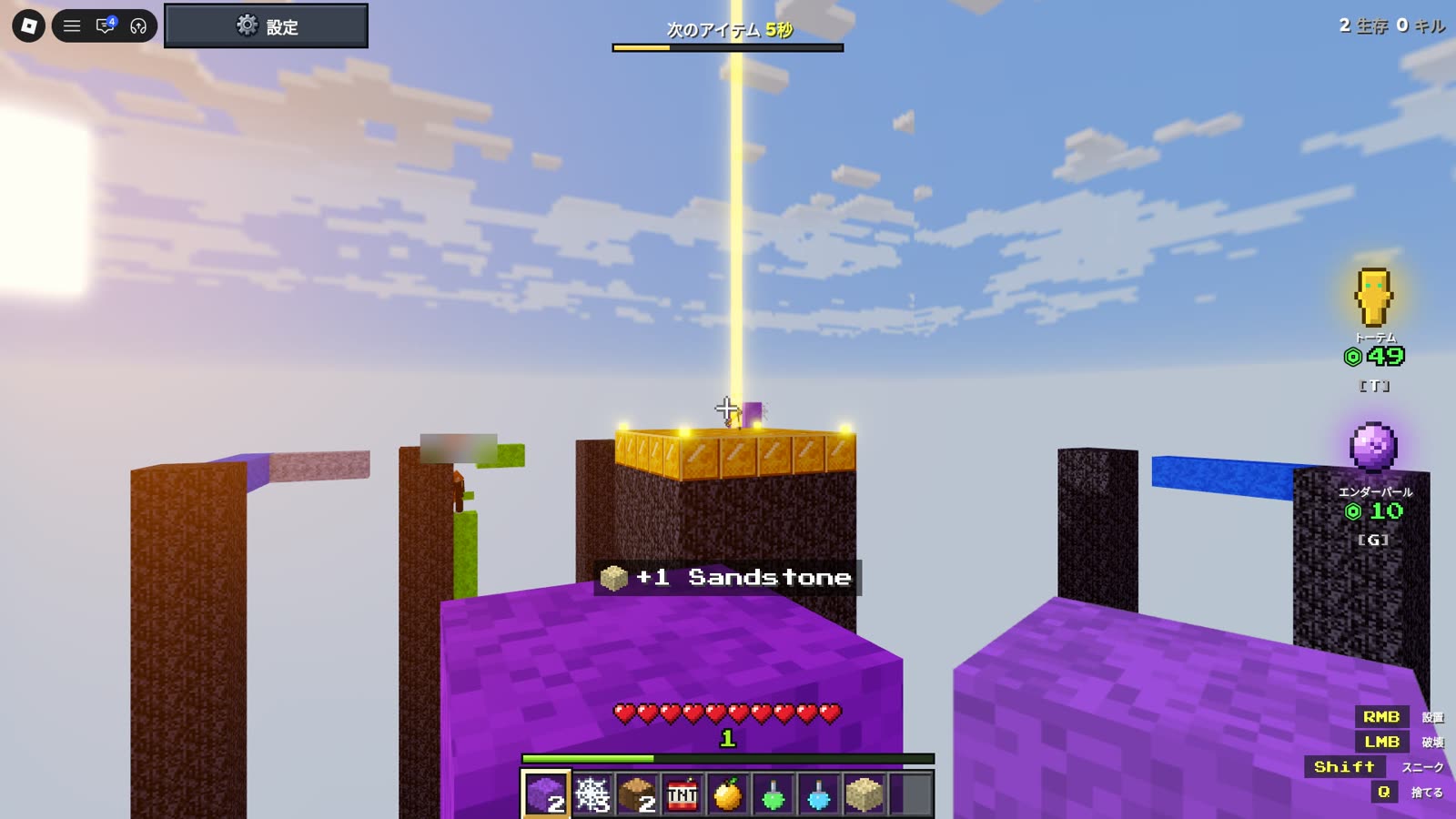
| Input in the capture | Displayed action | Scope |
|---|---|---|
| RMB (right mouse button) | Place | A building block is selected |
| LMB (left mouse button) | Break | The block context; not proof of an attack input for every item |
| Shift | Sneak | A visible label, not a tested speed or edge-protection effect |
| Q | Drop | A visible label; inventory consequences were not tested here |
These are third-party prompts, not successful inputs tested by this wiki. A later version, another selected item or a different device can show other instructions. Read the prompt beside the item you are holding before relying on a binding.
Find the current instructions in Roblox
Join the original Towers of Fortune by 900 Pixels. Open Roblox's in-experience menu and look for Help. Roblox's official Settings and Help documentation identifies Help as the place for keyboard, mouse and mobile gesture instructions.
Use those instructions for movement, camera and jumping rather than treating a generic key list as a game-specific test. Item-specific HUD prompts add context that a platform help panel may not provide.
- Read the selected slot and item name.
- Read the current action prompt, if present.
- Check the target or placement preview before using the input.
- Observe one action from a position with room to stop.
- Recheck the prompt after selecting a different item.
For the round objective and starting supplies, use the beginner guide. For identifying unfamiliar gear, use items and blocks.
Phone and tablet controls
This wiki has not completed a mobile-client control test. We therefore do not label a guessed touch button as Place, Break or Use, and do not map desktop mouse buttons directly onto taps.
On your device, read the visible touch interface and Roblox Help. Identify movement, camera, jump, item selection and the selected item's action separately. If a button is unclear, look for its current label before trying it near an edge. An account or device access message is a separate issue from not knowing the controls.
A useful correction includes the device, orientation, date, selected item and a screenshot of the actual control. Remove personal information before sending it through Contact.
Camera, graphics and accessibility
Roblox Settings contains camera, graphics, volume and accessibility options. Availability can depend on the experience and device. Inspect the options you actually have, change one at a time and note whether the result helps.
Shift on the pictured HUD is labelled Sneak. That screenshot does not establish how it interacts with Roblox's separate camera or Shift Lock options. Do not assume that two similarly named actions have the same effect.
If placement or an item action surprises you
Check the selected item first, then the current prompt and the position of any preview. Record what changed after the input rather than repeatedly pressing unrelated buttons. The survival guide provides a separate checklist for footing and nearby approaches.
This is an inspection method, not a confirmed fix for a particular bug. For a loading failure, return to the official listing and Roblox support rather than installing an unofficial control tool or extension.
Sources and review scope
Reviewed 28 November 2026: the linked PC screenshot and Roblox's official Help documentation. The image establishes visible labels in one captured context. It does not establish current movement bindings, mobile gestures, combat inputs for every item or any completed hands-on test by this wiki.
Common questions
Which mouse button places a block?
The linked third-party PC capture labels RMB as Place with a block selected. This wiki inspected that image but has not reproduced the action in the client.
Does LMB always attack?
No universal attack binding is established here. The inspected block context labels LMB as Break; read the prompt for your selected item.
Are the mobile buttons verified by this wiki?
No. Use Roblox's Help menu and the visible controls on your device; this page does not invent a Towers of Fortune touch layout.
Should I use a fixed sensitivity setting?
There is no tested universal value here. Check your available settings and change one option at a time while observing the result.